

What is Pearl?
The Pearl platform gives jobseekers with non-traditional backgrounds a competitive edge in their job search. The platform improves their odds of getting hired through in-app portfolio builders.


Need
Retain users and keep users active on the platform after initial sign-up with the ultimate goal of them publishing and sharing their portfolios.

Problem
Users feel overwhelmed by the process of creating a professional portfolio from scratch. They are also unsure about what to include and are concerned about the time investment.
Solution
Provide clear, accessible guidelines and straightforward steps to build a diverse, standout portfolio showcasing her industry skills and potential.


Progress Indicators

Clickable Examples

Step-by-Step Case Study Builder


The process that I transformed the problem into a solution
DAY
1
DAY
2
DAY
3
DAY
4
DAY
5
DAY
6
DAY
18
DAY
7
DAY
8
DAY
9
DAY
10
DAY
11
DAY
12
DAY
13
DAY
14
DAY
15
DAY
16
DAY
16
DAY
17
DAY
20
DAY
19
Define Persona, Problem Statement, HWM
Meet client
Research Interview, Survey, Competitive Research
Meet client
Ideate User Flow, Sketches
Deseign Design System, Lo-fi, MI-FI, Hi-Fi, Usability test
Insight of Pearl's Business (Meet with stakeholder)
As a team, we first met with a stakeholder, Pearl's CEO, to get an initial understanding of the company's goal.

What makes Pearl unique for your target audience?
It saves time and is more reflective of the work you’re doing, embedding your work and making it easy, prompting, and guided.

About PEARL
.png)
What strategies have you tried so far to keep these new users active?
A couple of email blasts afterward. The key assumption is keeping the users engaged mostly through emails.
Are there any specific features or improvements that you’ve already begun to address the retention issue?
I started planning them, not pushing them. Pushed a UI update. The previous iteration felt too “profily.” It felt like a profile. I'm trying to make it look more like a portfolio.
About User Acquisition & Retention
Comprehend Users' True Needs (Survey)
After the meeting, I surveyed 58 individuals to explore their actual needs when creating a portfolio as perceived by job seekers.
Have you ever created an online portfolio to showcase your work?

No, I have never created one
Yes, I have created one before
I've tried to create one but didn't
complete it
If you haven't created a portfolio or didn't complete one, what's the main reason?

I don't know how to create one
I'm not sure what to include
It seems too time-consuming
I don't have any work samples
How many years of experience do you have in your current field?

1-3 years
Less than 1 year
4-6 years
7-10 years
Deeper Understanding on Our Users (Interview)
I chosed to interview 6 interviewees from the survey to talk about their perspective on portfolio building tool.

I want to build my portfolio without a lot of stress.
-Jane

I like get started with examples which helps give me a base on where to start from.
-John

Preset styles, templates and placeholders are helpful when creating a portfolio to kickstart.
-Kate

I like to finish sections one at a time. i will finish a section and revisit it after a while.
-Jorden

I would create my template first before starting building my case study
-Lily

Want to switch between light and dark modes.
-Henry
Takeaway from Research Phase
Pearl wants to enhance UI/UX design to make users feel more comfortable editing their portfolio so they will stay. However, users seem to struggle with starting to build their portfolios from scratch, particularly because they are concerned about the time investment involved. As a result, they give up after signing up.
Define Target Audience (Persona)
After synthesizing the data I collected, I created the persona - Lisa based on an affinity map.

Lisa Watson
Age - 30
Job - Sales
Location - Austin, TX
Lisa is a current jobseeker who was a saleswoman but is looking to transition into the tech industry. She is proactive, ambitious, and growth-oriented.
Paint Points
-
As a beginner, she is unsure how to approach the creation of a professional portfolio.
-
Overwhelmed by the long learning curve process of portfolio websites.
-
Confused by industry expectations for tech portfolios.
Goals
-
Efficiently showcase her work.
-
Create her first professional portfolio to start applying to jobs right away.
-
Connect with potential clients and collaborators.
Behaviors
-
Seeks inspiration and examples from other creators in their field.
-
Always preview work before publishing.
Identify Problem and Solution (Problems and HMW)
I used HMW to brainstorm possible solutions that fix uses' painpoints and problems.
Problems
Overwhelmed by the process
Creating a professional portfolio from scratch
Unsure about what to include
Concerned about the time investment
HMW
How might we simplify the process and provide enough flexibility for users to create a portfolio?
Features
Feature Portfolio
Progress Bar
Progress Indicators
Step-by-Step Case Study Builder
Takeaway from Define Phase
In this phase, we decided the main direction we may go in design process. We focus on how to encourage users keep building their portfolio without too many stress. The possible solutions is to give them some examples and instruction at the beginning.
Define the Journey for Pearl's Users (User flow)
I started by drafting a user flow to see how can we streamline the portfolio building process with Pearl.
Homepage
Fill out experience
See examples
Select a theme color
1. Cover image
2. Title
3. Overview
4. Problem
5. Solution
6. Outcome
Attech project
Fill the case study
Add a case study
Attech a case study?
Yes
No
Preview
Save as draft
No
Publish comfirmation
Portfolio page
Yes
Homepage
Turn User Flow to Wireframe (Sketch)
After UX research and defining solutions, I designed the wireframes to arrange elements and create an intuitive structure, focusing on navigation and onboading.

Takeaway from Ideate Phase
In this phase, I design the screens for building a portfolio. My main idea is to show a progress bar and set clear steps on the top, so the users will feel much less stressed.
Final Design - Homepage

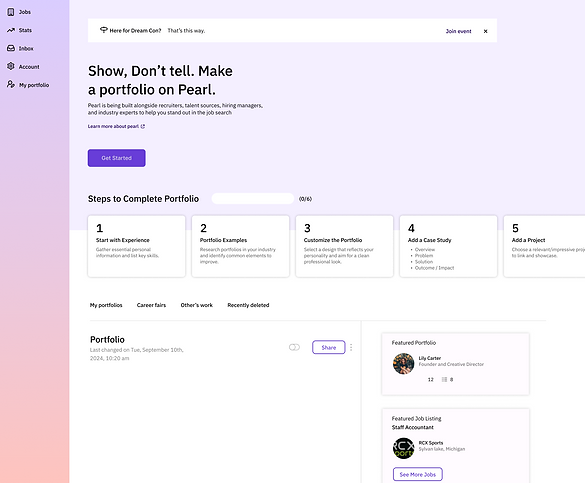
User Profile
Users will be prompted on which portfolio they would like to open if using this entry point.
Progress Indicators
If users complete any of the following steps and then skips others - the steps that were complete will have a mini checkmark or indicator to show their progress when returning.
Visibility Control
Users have choice to publish and make their portfolio visible to recuiters or public.
Feature Portfolio
Pearl provides several portfolio examples for first-time portfolio builders to understand what is portfolio and case study quickly.
Feature - Building Portfolio Homepage

Progress Bar
A progress bar helps reduce stress by showing users their progress and remaining tasks, making the portfolio-building process more manageable.
Smart Skill Suggestions
Skills are suggested based off of resume/work uploaded.
If user signed in with LinkedIn, some of these prompts will be auto populated, with the option to edit.

Clickable Examples
During onboarding, we provide case study examples and styles to inspire users and help them clarify what to include in their portfolio.

Curated Style Options
Offering a few curated style options simplifies the process and helps them build their aesthetic more easily.
Feature - Writing A Case Study

Progress Bar
Users will see the mini progress bar on the top to encourage them keep complete their portfolio.
Auto-Populated Portfolio Preview
At this stage, users get an initial preview of their portfolio homepage. The system automatically populates work experience and skills based on the uploaded resume or linked account from the first step.

Step-by-Step Case Study Builder
Pearl guides users step-by-step prompts to help them fill out their case studies, showcasing their skills and project accomplishments effectively.

Efficient Case Study Templates
Pearl provides simple yet robust templates for case studies, enabling users to complete multiple projects efficiently.
Attachment/Media
Users can add medias flexibly to support their content for each section.
Thank you for watching!
👋